
10 Benefits of Using 3D Product Configurators for Custom Quotes
Still quoting custom products manually? See how a 3D product configurator speeds up quotes, improves product configuration, and helps buyers move faster.

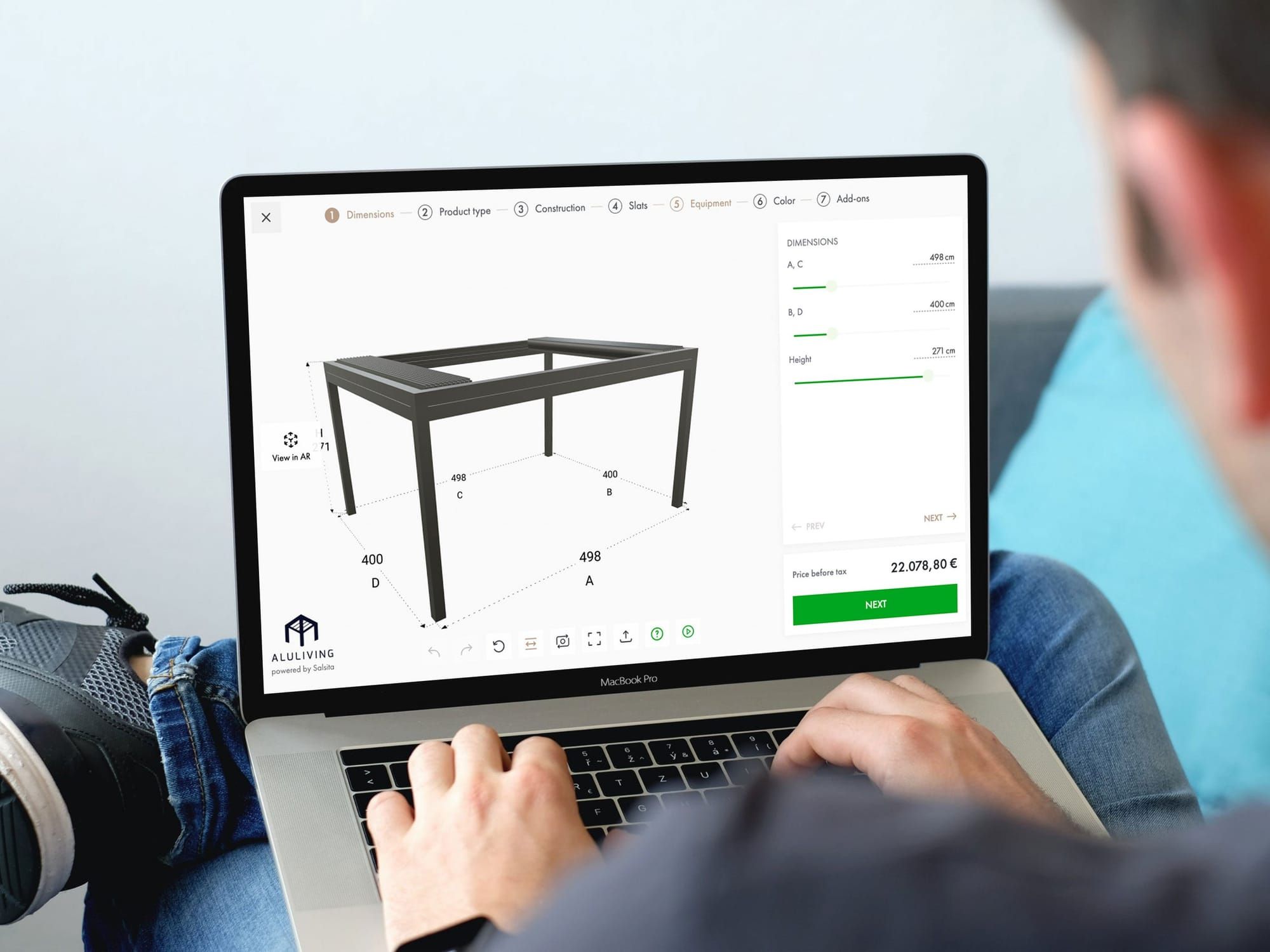
Every day you keep quoting custom products manually, you make your business easier to beat.
While your team is still chasing requirements, checking combinations, and building quotes step by step, other brands are letting buyers configure products, see pricing, and move forward in a few minutes.
How much longer can you afford to quote manually while competitors automate?
If you want to remove friction from custom quoting for both buyers and your team, let’s look at 10 reasons why you should use a 3D product configurator for custom quotes:
- 1. Generate Quotes 10X Faster
- 2. Eliminate Quote Errors with Rule-Based Logic
- 3. Increase Conversion Rates
- 4. Help Dealers Quote Faster and Better
- 5. Boost Average Order Value by 25%
- 6. Stop Sales-Engineering Back-and-Forth
- 7. Make the Sales-to-Production Handoff Smoother
- 8. Make Custom Quotes Easier to Manage Across Systems
- 9. Differentiate from Your Competitors
- 10. Scale Quote Volume Without Adding Headcount
Why Custom Quotes Create So Much Friction
If you sell custom products online, you are probably stuck between two realities.
Buyers want to compare options, understand price, and make progress before they talk to sales. PwC found that 69% of consumers compare prices before deciding whether to engage with a brand. But many custom quote workflows still rely on forms, spreadsheets, and manual checks.
That gap creates friction fast. In our analysis of 120 storage and cabinet websites, we found that only 5% offer a 3D product configurator, 63% show no visible pricing, and 72% pushed buyers into a sales-assisted journey. So buyers are often asked to make a complex decision with weak product guidance, no budget context, and no fast path forward.
And the friction does not stop with the buyer. It carries through the entire quoting process:
- Buyers cannot clearly visualize the custom setup
- Basic pricing still starts with a form or email
- Sales gets pulled into routine quote work
- Engineering is asked to validate standard combinations
- Deals slow down while everyone waits
By the time a real quote is ready, the buyer has already hit too many blockers. And your team has already spent time on work that should not be manual in the first place.
That is what makes custom quoting so hard to scale. Too much of the process still relies on manual work, slow responses, and buyers willing to wait. Here are 10 ways a 3D product configurator helps fix that.
1. Generate Quotes 10X Faster
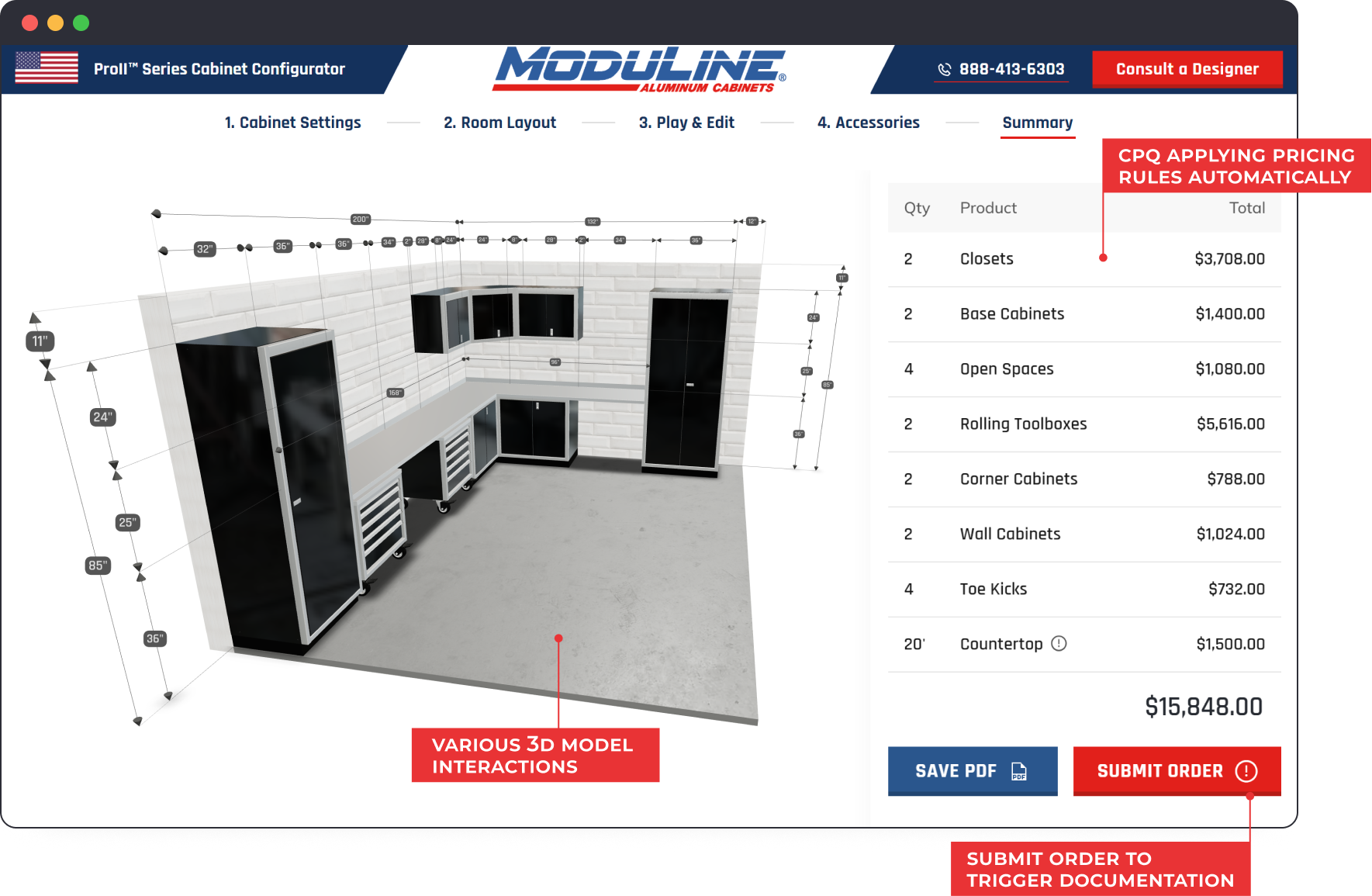
A product configurator doesn't just speed up one step. It restructures the entire quote workflow by moving critical work earlier in the journey.
Instead of starting with a vague request that needs days of back-and-forth, buyers start with a real, valid configuration. The product updates visually as they build, while pricing runs in the background, calculating cost in real-time.
Picture Perfect, a custom bathroom vanity manufacturer, saw the ROI of a 3D product configurator firsthand. What used to involve hours of back-and-forth is now a five-minute online flow. Customers configure their vanity, see the final price, and move to checkout, often without involving their team at all. The result: 90% faster online buying flow. Read the full case study.
Manual Quoting vs. 3D Product Configurator: Steps and Time
| Step | Traditional Process | With 3D Product Configurator |
|---|---|---|
| Initial Inquiry | Customer emails: “Need quote for cabinets, I am rebuilding my kitchen” | Customer opens configurator |
| Understanding Requirements | Sales calls to discuss size, style, and features: 30–45 min | Customer selects options visually: 5 min |
| Configuration | Sales sketches or describes options by email: multiple rounds | Customer sees options in real-time 3D: instant |
| Feasibility Check | Sales asks engineering: “Can we do this?”: 2–4 hours | Rules engine validates automatically: instant |
| Pricing | Sales calculates pricing manually: 30–60 min | Customer sees pricing update immediately: 1 min |
| Revisions | Customer wants changes, process repeats: 1–3 days | Customer adjusts configuration immediately: 1 min |
| Final Quote Delivery | Sales prepares formal quote document: 30 min | Customer adds configured product to cart: 1 min |
| Total Time | 3–5 business days | 5–10 minutes |
2. Eliminate Quote Errors with Rule-Based Logic
Manual quoting breaks down when product logic lives in too many places. One spreadsheet handles prices. A sales rep remembers compatibility rules. Engineering knows what can actually be built. The buyer sees none of it.
A 3D product configurator pulls those layers together. Hard rules can block impossible combinations. Soft rules can guide the buyer toward recommended setups. Pricing stays tied to the actual configuration instead of a separate estimate. That is how quotes never get wrong.
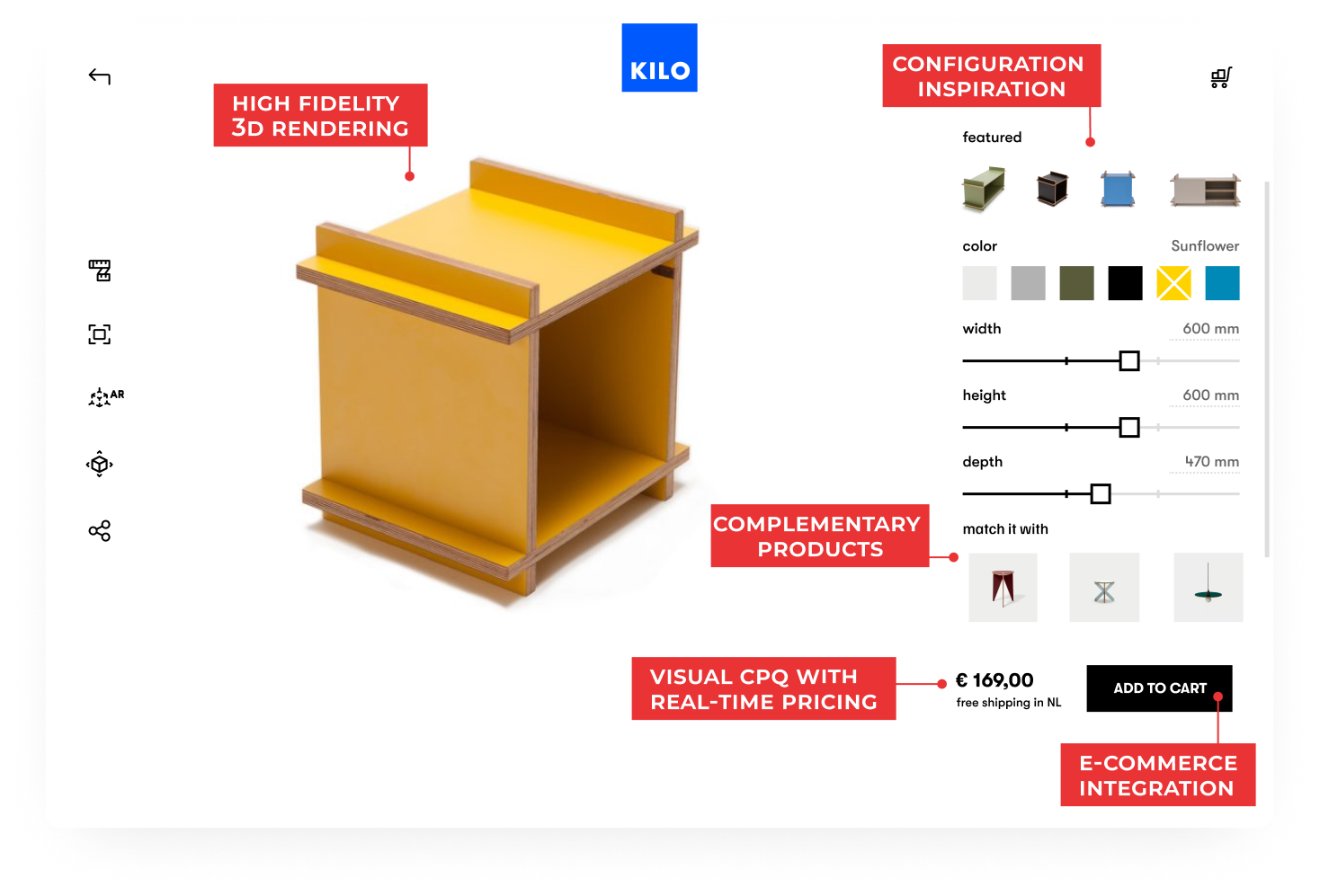
Moduline, a modular cabinet manufacturer, used this kind of structured logic to reduce friction across the quoting process. Instead of relying on manual checks and repeated support intervention, their sales team uses a product configurator internally to do the work in minutes and share it with buyers. The result: 90% fewer manual errors.


3. Increase Conversion Rates
Buyers hesitate when they can't see what they're buying. Static images galleries of finished products do not show what is customizable and do not engage. Add unclear pricing, or no pricing at all, and most buyers will leave your website within the minute.
Gartner found that 61% of B2B buyers prefer a rep-free buying experience—but only when they have the tools to research independently.
This is where the combination of a 3D product configurator and Visual CPQ makes a real difference. Buyers can build the product, see their exact configuration in 3D, and understand how their choices affect the price in real time. That makes the whole experience feel clearer and more trustworthy. And that is how conversion rates naturally increase.
| Buyer Question | How a 3D Product Configurator Solves It |
|---|---|
| “Will this look right?” | High-fidelity 3D renderings show the exact appearance. |
| “Will it fit my space?” | Accurate dimensions in context make size easier to judge. |
| “What will it actually cost?” | Real-time pricing updates for the exact configuration. |
4. Help Dealers Quote Faster and Better
If you sell through dealers, quoting gets harder to control. Each dealer has to understand the product, apply the right rules, and build a quote that matches what your team can actually approve and deliver. Without the right setup, that usually means forms, PDFs, manual checks, and constant follow-up between dealers and internal teams.
A product configurator makes that process much easier to scale. Dealers can configure the product inside the same logic your business uses, get pricing instantly, and submit projects in a much more structured way. That reduces quoting errors, cuts manual work, and helps dealers move faster without relying on your internal team at every step.
Azenco Outdoor is a good example. Before the configurator, its dealer network relied on a manual quoting process built around forms, shared dimensions, and 3D drawings created only after an order was placed. After the rollout, dealers could configure, price, and submit projects in one workflow, while Project Managers reviewed and approved everything in one place. Quotes that used to take days became ready in minutes instead.
“Before the configurator, quoting was repetitive and time-consuming. Now our dealers can create accurate quotes in minutes, and our Project Managers only step in when needed. Everything runs faster and smoothly.” Margaux Gazzano, Director of Operations, Azenco Outdoor
5. Boost Average Order Value by 25%
Traditional quoting leaves money on the table. Sales reps forget to mention upgrades. Buyers do not know premium features exist. And suggesting add-ons during a phone call may feel forced.
A 3D product configurator makes upselling feel natural. Relevant upgrades appear as buyers configure. They can see the premium version in 3D instantly. The price difference is clear, so the value of the upgrade is easier to understand.
This is exactly what Picture Perfect, a company selling custom vanities online, saw after launching its product configurator. Orders coming through the configurator reached a 25% higher average order value because buyers explored more options and added upgrades during configuration.
6. Stop Sales-Engineering Back-and-Forth
In many custom quote workflows, sales is stuck playing messenger between the buyer and the technical team. A request comes in, someone checks whether the configuration is possible, a few details need clarification, dimensions get adjusted, and the quote goes back for another round. Even when the final quote is correct, too much time gets lost in internal back-and-forth that should not be necessary in the first place.
This is where a product configurator changes the process. Instead of sending half-defined requests downstream, sales or the buyer builds the product inside a system that already knows the rules. Engineering no longer has to step in just to validate routine combinations or fix avoidable mistakes.
| Step | Without a Product Configurator | With a Product Configurator |
|---|---|---|
| Request Setup | Sales gathers requirements manually. | Buyer or sales rep configures inside predefined rules. |
| Validation | Engineering checks feasibility afterward. | Rules validate feasibility instantly. |
| Corrections | Invalid combinations trigger revision rounds. | Invalid combinations are blocked upfront. |
| Missing Details | Follow-up emails or calls are needed. | Required inputs are captured during configuration. |
| Engineering Involvement | Routine requests often need review. | Engineering focuses on exceptions. |
| Typical Sales-Engineering Back-and-Forth Before a Quote | 2–4 rounds over 1–3 days | Little to none for standard configurations |
7. Make the Sales-to-Production Handoff Smoother
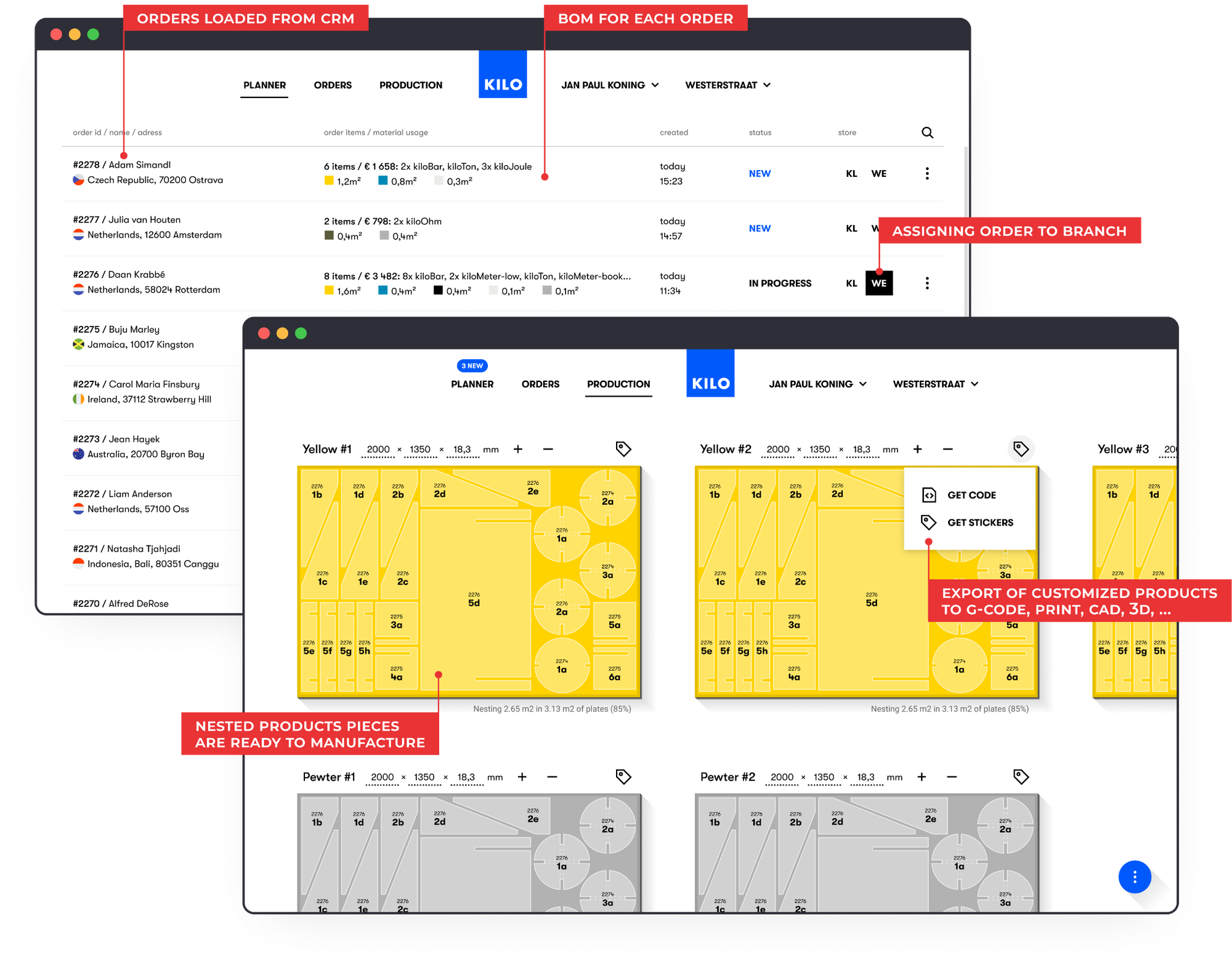
When sales and manufacturing are not working from the same exact product definition, delays, misunderstandings, and avoidable rework start piling up. One of the clearest advantages of a 3D product configurator is that it keeps both sides aligned around the same configuration, so what the customer builds is also what production is preparing to make.
Each configured order carries the specifications needed downstream, which makes the handoff much clearer. Instead of relying on vague notes, or manual re-entry, manufacturing receives structured product data tied to the approved configuration. What the buyer sees and selects is the same setup the factory works from.
That can include production outputs such as:
- Bill of Materials (BOM): A complete list of the parts, materials, and quantities needed to produce the configured product.
- CAD files or cut sheets: Technical production files that show how the configured product should be made or cut.
- Order-specific production documentation: Production instructions and order details prepared for that exact configured version.
8. Make Custom Quotes Easier to Manage Across Systems
A custom quote becomes much easier to manage when the product configurator acts as a single source of truth. Instead of rebuilding the same order details across different systems, teams can work from one consistent set of product, pricing, and customer data.
That is where a 3D product configurator adds value beyond the quote itself. The approved configuration can stay connected to the CRM, flow into the ERP, and support e-commerce workflows where relevant. That makes it easier to keep quote data aligned across the wider sales process, even as orders move between teams and systems.
Sales, operations, and e-commerce teams all work from the same configuration instead of translating or duplicating information along the way.
| Connected System | Benefit for Custom Quotes |
|---|---|
| CRM | Keeps quote activity tied to the lead, account, or opportunity. |
| ERP | Moves approved quote data into order processing. |
| E-commerce Platform | Lets the buyer add the configured product directly to the cart. |
9. Differentiate from Your Competitors
In many custom product categories, the online experience still feels surprisingly basic. Our study of 120 storage and cabinet websites found that only 5% offer a 3D product configurator. Most still rely on static discovery and hide pricing. In other words, better product exploration is still far from standard.
That creates a real opening for brands willing to do more. A 3D product configurator does not just make the product easier to understand. It makes the whole buying experience feel more modern, more interactive, and more memorable.
Sunlife Beachwear pushed that idea further. It is the only premium men’s swimwear brand to bring true 3D customization into the buying experience, moving beyond static images toward interactive product exploration. By combining 3D customization with Visual CPQ, it created a more distinctive path to purchase and a stronger way to stand out.
“We’re investing not just in product quality, but in the overall experience. Because that’s where real differentiation happens.” Troy Dankworth Founder, Sunlife Beachwear
10. Scale Quote Volume Without Adding Headcount
As quote volume grows, the usual response is to add more people to keep up. More requests mean more follow-ups, more product checks, more pricing work, and more coordination across teams. That may solve the immediate pressure, but it does not fix the process itself.
A 3D product configurator changes that by taking routine quote work out of your team’s hands. Buyers or sales reps can build valid products inside predefined rules, see pricing update in real time, and move forward without all the usual back-and-forth. That means the same team can handle more quote volume because fewer hours are being spent on repetitive checks, corrections, and manual quote preparation.

Wrapping Up
Custom product quoting doesn't have to be slow and manual. A 3D product configurator transforms how buyers explore options, how sales teams or dealers generate quotes, and how manufacturing receives orders.
The market has shifted. 61% of B2B buyers prefer self-service. 39% are willing to spend $500K+ online. Yet only 5% of custom product websites offer the tools buyers need to configure and price products themselves.
That gap is your opportunity.
Manufacturers adopting 3D product configurators are not just improving efficiency. They are giving buyers an experience that clearly sets them apart from competitors still relying on static pages, hidden pricing, and manual quoting.
Your quoting process either enables growth or limits it. The question is: how much longer can you afford to quote manually while competitors automate?
Want to turn your quote process into a competitive advantage? Book A demo focused on your business.
FAQ
Do 3D product configurators make custom quotes more accurate?
Yes, when they include rule-based logic and connected pricing. They help prevent invalid combinations and keep pricing tied to the actual configuration instead of a separate spreadsheet or manual estimate.
Are 3D product configurators only useful for ecommerce?
No. They are useful anywhere a buyer, dealer, or sales rep needs to configure a product and generate a quote more efficiently. That includes ecommerce, dealer portals, internal sales tools, and assisted B2B quoting workflows. McKinsey’s latest B2B research supports the need for multiple buying paths across in-person, remote, and digital self-service channels
Do buyers really need pricing this early?
In many cases, yes. Our cabinet research found that 63% of websites showed no visible pricing, while Forrester says buyers expect more price transparency and that stalled purchases are common. Even partial price guidance can help buyers decide whether to continue.
Learn More About Product Configurators
Understanding Configurators:
- What Is a Product Configurator and How It Works
- Benefits of a Product Configurator: Why Your Business Needs One
Software Selection:
- Best CPQ Software for Manufacturing in 2026
- Top 5 Best 3D Configurators for Enterprise-Scale Product Customization
- Checklist: 10 Questions Before Choosing a 3D Configurator Software Provider